
Your gamepad,
now an AI controller.
The dedicated Codex Micro keypad costs $230 — and sold out. JOY/MICRO turns the controller already in your drawer into the same kind of AI control surface, free: drive Codex and Paseo on the Mac, or let your iPhone take over Codex. Voice, send, navigation and reasoning effort at your fingertips — simulate first, then execute for real.
Codex Micro keypad · $230 · sold outYour gamepad · $0 · already at home
Or let your AI agent install it — paste this into Claude Code or Codex:
Install JoyMicro on my Mac by following https://github.com/joymicro/joymicro/blob/main/skills/joymicro-install/SKILL.mdIndependent software. Not an official OpenAI, Work Louder or Paseo product.
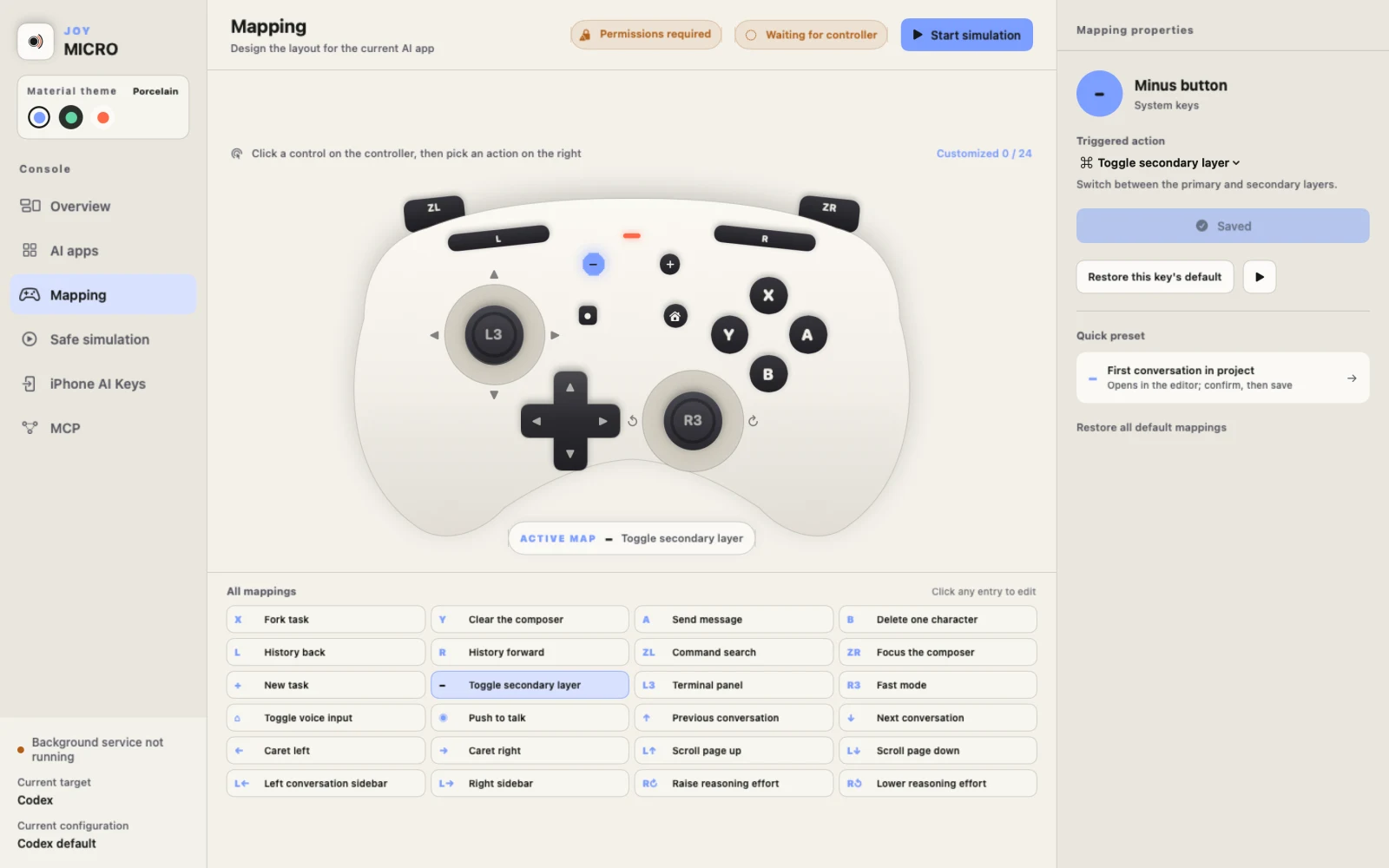
 JoyMicro for MacMapping · Safe simulation · Permissions · MCP
 Codex / Paseo DesktopBoth targets supportedCodex
Actions run on the Mac over a trusted Wi-Fi network. Codex only for now — Paseo is not yet supported.
Not one keypress saved.
One interruption removed.
Voice, send, fork, switching conversations, tuning reasoning effort — normally scattered across the mouse, menus and dozens of shortcuts. JOY/MICRO pins them to fixed physical positions: your fingers remember the moves while your eyes stay on the task.
- 01
Voice input
Hold to talk and release to finish, or tap once to dictate.
- 02
Edit & send
Send, delete, clear, or fork a new task straight from the current conversation.
- 03
Navigation
Search, switch conversations and agents, sidebars, Terminal and Review.
- 04
Reasoning & modes
Step reasoning effort with the stick, toggle Fast mode with one press.
Hold to talk — words land in the composer the moment you release.
Illustrative rebuild · every control triggers a real Codex action
Simulate first. Execute when sure.
Web demo · never touches your computerOnce LIVE · SAFE is on, physical input is safely intercepted: presses only highlight in the simulator and write to the log — no shortcuts sent, no window focused, no real conversation touched. Stop or leave the page and real control resumes instantly.
Press “Start simulation” to go LIVE · SAFE, then press any control on the pad — this shows what it would trigger. The real app receives nothing.
In the real apps: no shortcuts sent, no focus stolen, no composer edits, no conversation switches; stopping, leaving the page or an expired heartbeat restores real control. Delete-one / clear are guarded by composer focus, and Paseo's send checks focus too.
Two control surfaces, one hub.
Physical keys build muscle memory.
Buttons, sticks and shoulders sit where your hands expect them. Every device keeps its own target app and 24 mappings in JoyMicro — remap visually, hot-reloaded on save.
No controller around? Your iPhone takes over.
Pair over a trusted Wi-Fi network; the Mac performs the real actions. 19 touch controls, haptic feedback, three material themes. Safe preview by default — live control needs one more confirmation. Codex only for now.
Illustrative rebuild, not a real screenshot. JoyMicro currently supports Codex only; Paseo is not yet supported.
One controller for Codex,
another for Paseo.
Each controller persists its own target app and 24 mappings — switch devices and the config follows. With two connected, buttons, sticks and layers never cross. Everything stays on your Mac: no cloud backend, no ads, no analytics SDKs.
Rather not edit configs? Just tell your AI.
“Set this controller's minus key to ‘first conversation in project’ — simulate it for me first, then save.”
The local MCP can read, simulate, edit and save mappings. It is optional — without it, device control, mapping and safe simulation still work.
Support status
CodexSupportedSupportedPaseoSupportedNot yetNow available as a free download — signed and notarized by Apple. Requires macOS 13 or later.